
AI Summarizer for Students: How to Study Smarter (Without Cheating)
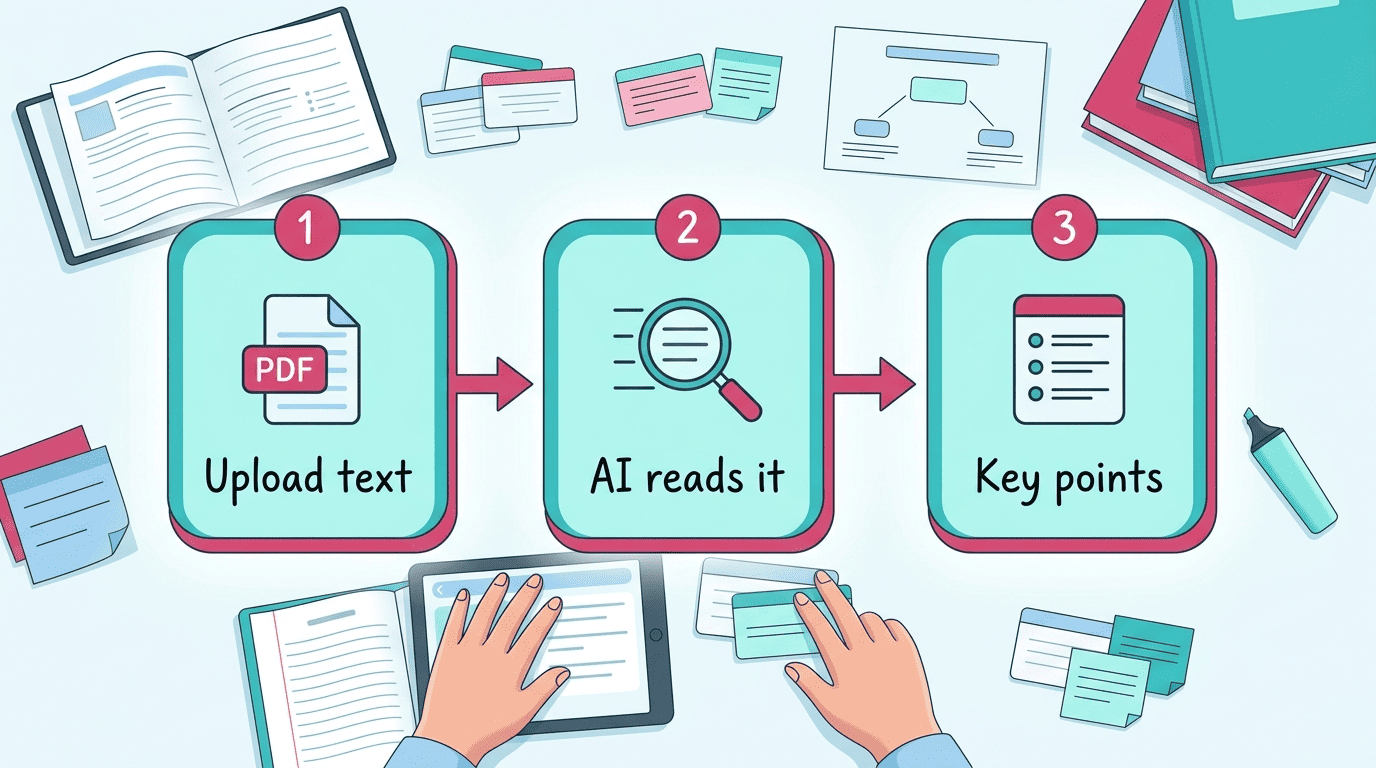
An AI summarizer is a tool that reads a long text — a PDF, a lecture, a research paper — and returns the key points in seconds. According to Wikipedia’s entry on automatic summarization, the goal of this technology is “to produce a summary that retains the most important points of the original document,” and modern tools do it almost instantly. Used well, an ai study tool for students turns hours of reading into a fast, focused study session.
Used badly, it becomes a shortcut that skips the actual learning. This guide shows how to use a summarizer to understand your material faster — not to hand in work you never read.

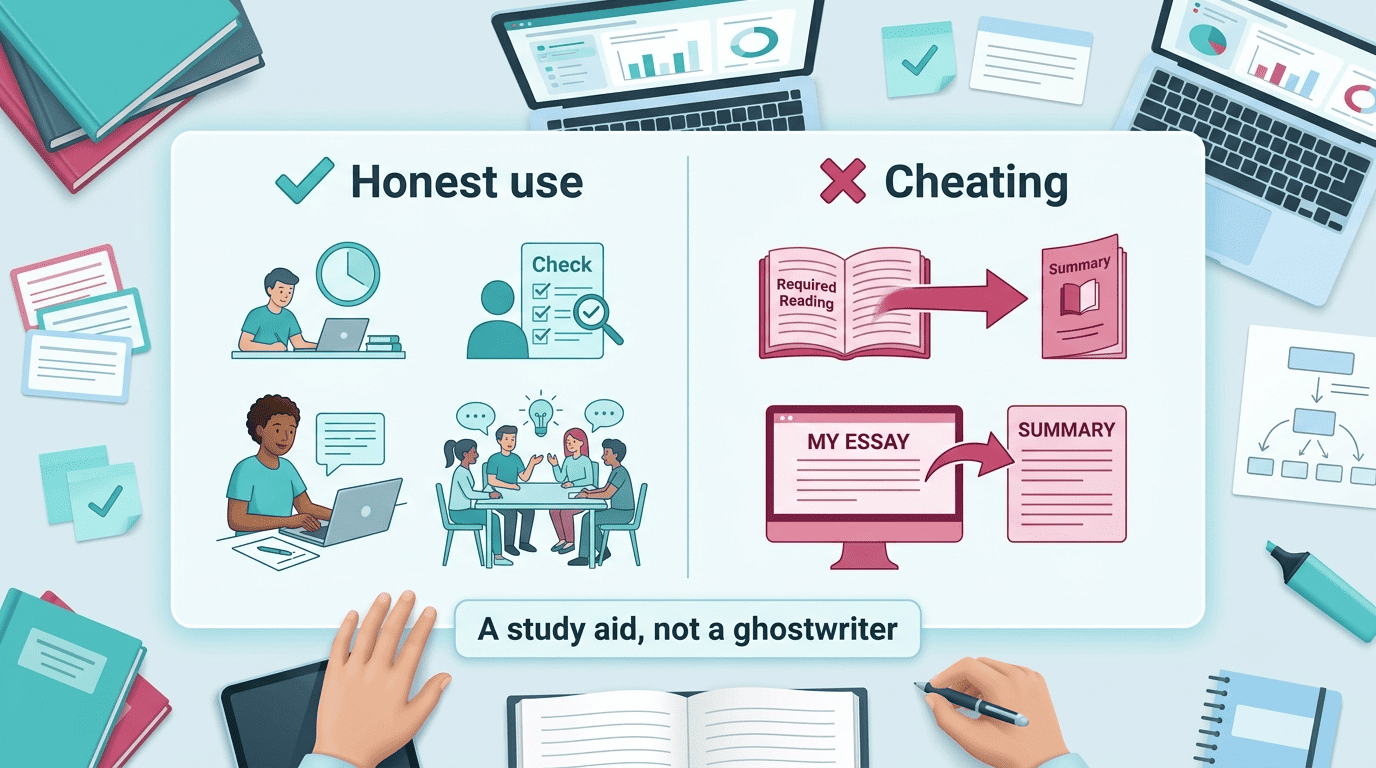
One rule up front: a summarizer is a study aid, not a ghostwriter. It helps you learn and revise — it does not do your assignments for you, and it is not a tool for cheating. Keep that line in mind as you read the workflow below, because how you use the output matters more than the tool itself.
What Is an AI Summarizer (and How Does It Work)?
An AI summarizer uses Natural Language Processing to condense a document into its core ideas — pulling out the claims, evidence, and structure that matter, and dropping the rest. Most tools give you a few common outputs to choose from:
- A bullet-point list of key ideas, good for a fast pre-class scan.
- A short paragraph summary that reads like a mini-abstract.
- An adjustable length, from a two-sentence gist to a half-page overview.
- Study extras like flashcards or quiz questions built from the same source text.
The basic idea
Feed the tool a PDF, an article, or pasted text, and it runs the content through an NLP pipeline that scores sentences and concepts by importance before assembling the summary. For readers who want the technical background, the concept is formally described as automatic summarization — the field concerned with condensing information while preserving meaning, covered in detail on Wikipedia.
Extractive vs abstractive summaries
Extractive summarization pulls the most important existing sentences straight out of the source and stitches them together, so the wording you get is the author’s own. Abstractive summarization instead rewrites the ideas in new words, closer to how a person paraphrases a chapter to a study partner. The practical trade-off: extractive summaries stay faithful to the original wording but can feel choppy or disjointed, while abstractive summaries read more smoothly — and are exactly where an AI text summarizer is more likely to introduce small errors or “hallucinate” a detail that was never in the source.
Is Using an AI Summarizer Cheating? (Academic Honesty)
The line between studying and cheating
The rule is simple, and worth stating plainly: using a summarizer to understand a chapter, build revision notes, or preview a paper before class is legitimate studying. Submitting an AI-generated summary as your own analysis, or using it to avoid reading assigned material you’re going to be tested on, crosses into academic dishonesty. This isn’t a gray area invented for AI — it follows the same standards academic institutions have applied to any outside help for decades.
The International Center for Academic Integrity defines the shared values that underpin honest work, describing them as honesty, trust, fairness, respect, responsibility, and courage. A summary tool doesn’t violate any of those values by existing — it’s how you use its output that decides whether you stayed on the right side of that line.
Academic integrity is a commitment, even in the face of adversity, to six fundamental values: honesty, trust, fairness, respect, responsibility, and courage. From these values flow principles of behavior that enable academic communities to translate ideals into action.
International Center for Academic Integrity
Honest-use checklist vs misuse (comparison)
The clearest way to see the boundary is side by side:
| Honest use | Misuse |
|---|---|
| Condense a reading to study it faster | Pass off an AI summary as your own essay |
| Turn a lecture into flashcards for revision | Skip required reading you’ll be tested on |
| Check your own understanding of a chapter | Submit AI-generated text without disclosure, where your school forbids it |
| Decide which sections deserve a closer read | Copy summary wording directly into graded work |
When in doubt, ask your instructor and check your school’s policy — rules on AI tools differ by course and by institution, and “everyone does it” isn’t a defense if your syllabus says otherwise.
How to Actually Study With an AI Summarizer (Workflow)
A summarizer works best as one step in a repeatable study routine, not a replacement for the routine itself. Here’s a four-step workflow that keeps you actively learning instead of passively skimming.
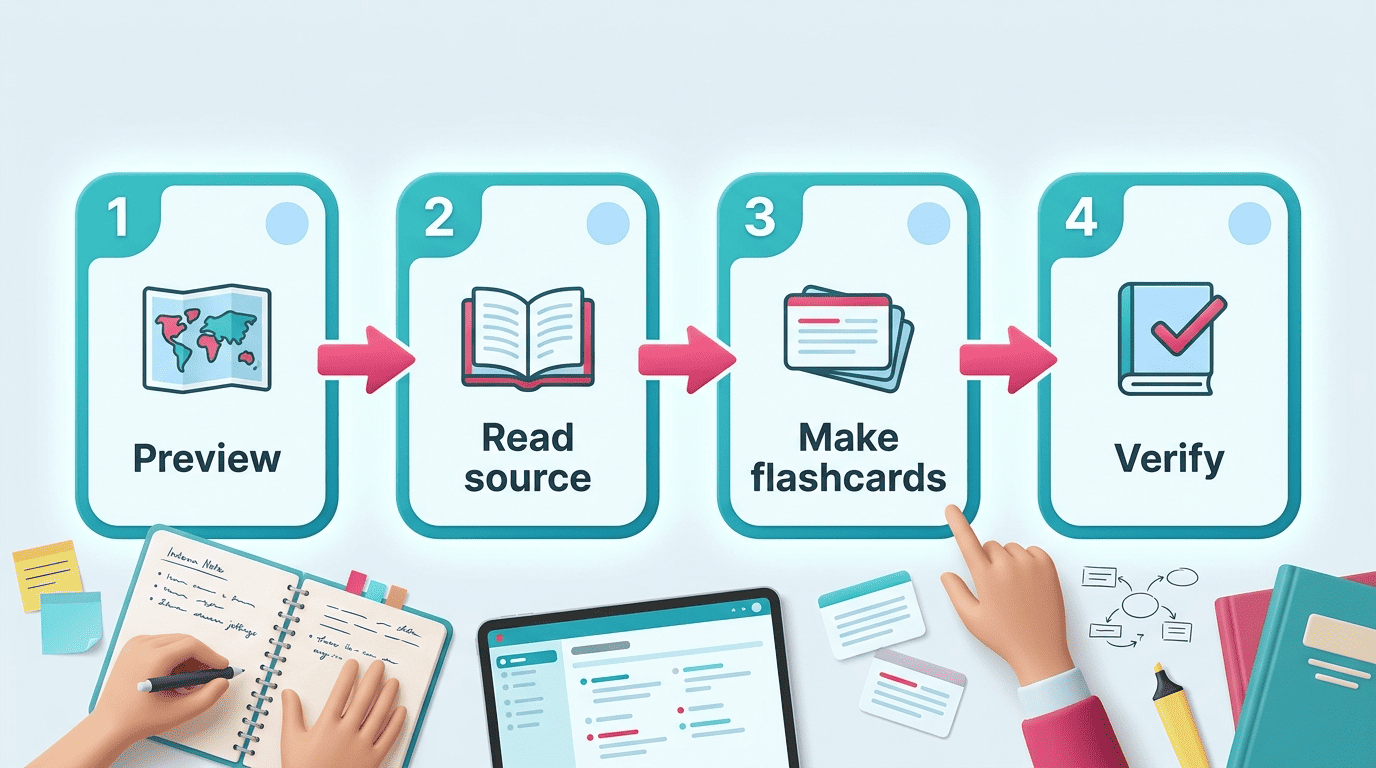
- Summarize to preview, then read. Run the chapter or paper through a summarizer first, so you know the structure and the main claims before you start. Read the summary as a map, not a substitute — go back to the source with a clear sense of what to look for.
- Turn summaries into active recall. Convert the key points into flashcards or practice questions instead of just re-reading them; tools like Knowt can generate flashcards and quizzes from a PDF in under 30 seconds. This step matters because it connects to the testing effect, the well-documented finding that recalling information (quizzing yourself) cements it in memory far better than re-reading does — see Wikipedia’s entry on the testing effect for the research behind it.
- Adjust length and format. Most tools give you controls worth using: QuillBot’s summarizer, for example, is free up to 600 words and offers four length levels with bullet-point or paragraph output. Pick short bullets when you’re revising the night before an exam, and longer paragraphs when you need to follow an argument’s logic.
- Verify against the source. Before you trust any fact, date, or definition from the summary, spot-check it against the original — this step is important enough that it gets its own section next.
Accuracy: Can You Trust an AI Summary?
Why you must double-check
AI summaries can drop nuance, miss a caveat, or state something the source never actually said. AI can make mistakes, so always double-check the summary against your textbook, the original paper, or your teacher before you rely on it — especially for exam facts, dates, formulas, and definitions. Vendor accuracy claims, such as Paperpal advertising roughly 95% context accuracy across 50+ languages, are marketing figures from the company itself, not independent guarantees, so treat them as a starting point rather than proof.
A quick verification checklist
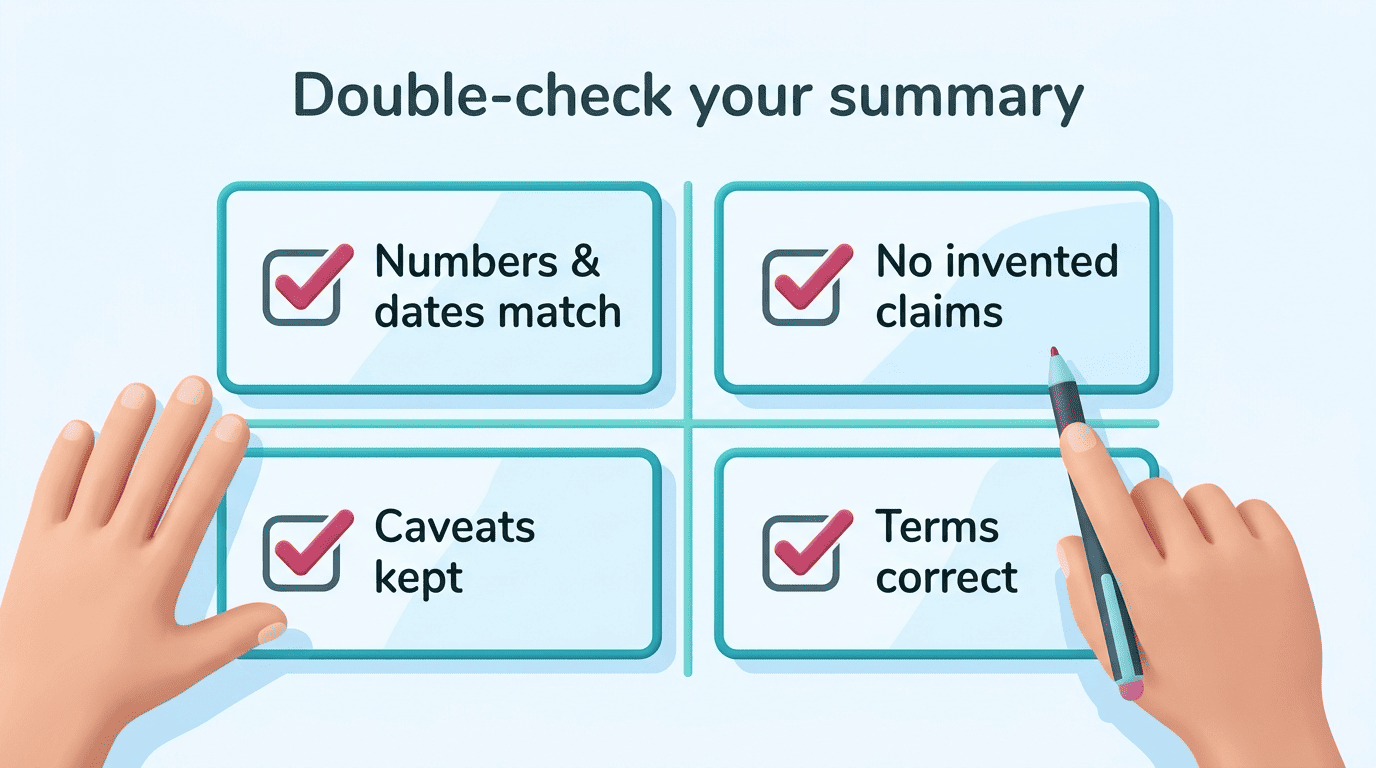
Before you use a summary for revision or cite anything from it, run through this short check:
- Do the numbers and dates in the summary match the source exactly?
- Is there any claim in the summary that doesn’t actually appear in the original text?
- Are key exceptions, caveats, or limitations preserved, or did the summary flatten them away?
- Are technical terms used correctly, or has the tool swapped in a near-synonym that changes the meaning?
- Would you be comfortable repeating this fact in an exam without checking the textbook again?
Best AI Summarizers for Students (by Use Case)
Different tools are built for different inputs, so the “best” one depends on what you’re feeding it.
For PDFs and textbook chapters
Smallpdf and Knowt both specialize in document uploads. Smallpdf accepts PDF, DOC, XLS, PPT, PNG and JPG files and deletes uploaded files within an hour, which matters if you’re summarizing course material you don’t want sitting on a server. Knowt is built specifically for students and pairs its summaries with auto-generated notes and flashcards, so you go straight from document to study material.
For lectures, videos and audio
Mindgrasp and NoteGPT handle spoken content. Both summarize YouTube videos, recorded lectures, and podcasts — useful when you missed a class or want to review a recording without re-watching the whole thing at normal speed.
For research papers
Paperpal is built for academic reading. It draws on a database of 250 million-plus articles across 50+ languages and produces plain-language research summaries along with citation help, which suits students working through journal articles for a literature review.
For quick text and free everyday use
QuillBot and Mindgrasp cover casual, low-friction summarizing. QuillBot’s free tier handles up to 600 words at a time, and Mindgrasp offers a no-signup option — both work fine for a quick news article or a short handout rather than a full chapter.
Here’s how the main options line up by primary strength:
| Tool | Best for | Notable detail |
|---|---|---|
| Knowt | PDFs and textbook chapters | Generates flashcards from a PDF in under 30 seconds |
| Smallpdf | PDFs, DOC, XLS, PPT, images | Deletes uploaded files within 1 hour; GDPR/ISO compliant |
| Mindgrasp | Lectures, video, audio | No-signup option for quick use |
| NoteGPT | YouTube videos and lectures | Free plan available |
| Paperpal | Research papers | 250M+ article database, 50+ languages |
| QuillBot | Quick everyday text | Free up to 600 words, bullet or paragraph output |
Whichever you pick, pair it with a broader ai learning tool so summarizing feeds into notes, flashcards and self-testing rather than sitting on its own as an isolated step.
How to Choose the Right Summarizer
Match the tool to what you actually need, not just to whichever one ranks first in a search. Work through these criteria before you commit to one:
- Input formats — do you mainly need PDF support, or do you also need video and audio?
- Free-tier limits — a 600-word cap is fine for articles but not for a 40-page chapter.
- Length and format control — can you switch between bullets and paragraphs depending on the task?
- Privacy — how long the service retains your uploaded files, and whether it follows standards like GDPR or ISO for data handling.
- Study artifacts — does it produce flashcards and quizzes, or just a shorter block of text?
As a simple test to apply to any tool: a mediocre summarizer makes text shorter; a good one makes ideas clearer.
For most students, the best setup is a single ai study tool that summarizes, makes flashcards, and lets you quiz yourself in one place, so you’re not juggling three separate apps for one study session.